Advanced Task Killer(Ads Free)1.2
Continue to app
Paid Version
Publisher Description
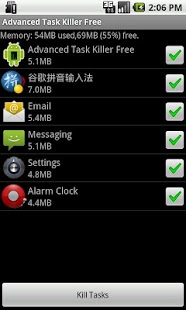
This free application enables you kill/auto-kill running applications or tasks in a single click, free up memory, and save battery.
Simple and easy to use.
Please send your suggestions/comments to innomobi.sh@gmail.com.
Keywords: task killer, task manager, battery saver
About Advanced Task Killer(Ads Free)
Advanced Task Killer(Ads Free) is a paid app for Android published in the Other list of apps, part of Development.
The company that develops Advanced Task Killer(Ads Free) is Innomobi. The latest version released by its developer is 1.2. This app was rated by 1 users of our site and has an average rating of 5.0.
To install Advanced Task Killer(Ads Free) on your Android device, just click the green Continue To App button above to start the installation process. The app is listed on our website since 2012-04-17 and was downloaded 30 times. We have already checked if the download link is safe, however for your own protection we recommend that you scan the downloaded app with your antivirus. Your antivirus may detect the Advanced Task Killer(Ads Free) as malware as malware if the download link to com.innomobi.taskkiller is broken.
The company that develops Advanced Task Killer(Ads Free) is Innomobi. The latest version released by its developer is 1.2. This app was rated by 1 users of our site and has an average rating of 5.0.
To install Advanced Task Killer(Ads Free) on your Android device, just click the green Continue To App button above to start the installation process. The app is listed on our website since 2012-04-17 and was downloaded 30 times. We have already checked if the download link is safe, however for your own protection we recommend that you scan the downloaded app with your antivirus. Your antivirus may detect the Advanced Task Killer(Ads Free) as malware as malware if the download link to com.innomobi.taskkiller is broken.
How to install Advanced Task Killer(Ads Free) on your Android device:
- Click on the Continue To App button on our website. This will redirect you to Google Play.
- Once the Advanced Task Killer(Ads Free) is shown in the Google Play listing of your Android device, you can start its download and installation. Tap on the Install button located below the search bar and to the right of the app icon.
- A pop-up window with the permissions required by Advanced Task Killer(Ads Free) will be shown. Click on Accept to continue the process.
- Advanced Task Killer(Ads Free) will be downloaded onto your device, displaying a progress. Once the download completes, the installation will start and you'll get a notification after the installation is finished.
Program Details
System requirements
Operating systems
Android 2.1 and up
Download information
File size
98.6 MB
Total downloads
30
Pricing
License model
Paid
Price
Version History
Here you can find the changelog of Advanced Task Killer(Ads Free) since it was posted on our website on 2014-06-13. The latest version is 1.2 and it was updated on Soft112 on 15 October, 2026. See below the changes in each version:
version 1.2
posted on 2012-04-17
version 1.2
posted on 2012-04-17
Several fixes and updates
